Module 9

For my assignment I used Shirley Chisholm’s speech from 1970 for the Equal Rights Amendment. 

Link for Speech: https://www.americanrhetoric.com/speeches/PDFFiles/Shirley%20Chisholm%20-%20For%20the%20Equal%20Rights%20Amendment.pdf

Kahoot! https://create.kahoot.it/share/sped-277-american-rhetoric/02eecb1f-bfc6-4ed4-b708-e96881636ea5

Piktochart https://create.piktochart.com/output/45977105-sped-277-american-rhetoric

The American Rhetoric obtains popular speeches in history with multiple means of representations. Some speeches are audio and/or printed text. This is a great tool because it gives the students the power in deciding on what source type they want to use and what worked best for them. Some students are visual learning and need a paper print out copy and others may only want to listen to the audio of the speech. Some students might even want to watch the speech when it was being held even at the period of time. Giving choices to students allows them to be successful with the material that works best for them.

Piktochart:

Piktochart is a great source for teachers and students to use because it’s fun, easy to use and it’s low to no cost. It is a free service that students can use at home. Students can also make presentations like PowerPoint slides, word documents, flyers, new papers, etc. Within the presentation type of document, it will include text and pictures. This is a great tool for students with disabilities because it allows students to communicate through pictures and short text. They can express themselves however they fit necessary.

Kahoot!:

Kahoot is a fun learning game teachers can create to check for understanding or to assess prior knowledge of students about a specific topic. Teachers can create the questions and assess which students are successful and those who are not. This software can be a great tool for students who have disabilities because it allows teachers to access student’s knowledge without the stress or anxiety of standardized testing. Teachers can challenge students with different types of questions or modify them. During Kahoot, teachers can play music within the question, funny pictures or videos. It also gives students the opportunity to use computers which can be fun or necessary to some specific students. Teachers can also give students extended time on questions that allows students the time they need.
Module 8: Learning Ally

Learning Ally is nonprofit educational organization to help school-age children and adults who are struggling learning by giving them the tools to reach their greatest potential. Learning Ally is a program that contains thousands of audiobooks that students can listen to when reading books. Students will improve their grades, score higher on test, gain confidence and self-esteem will rise. 

AAC Devices- WP7

Augmentative & Alternative Communication Devices

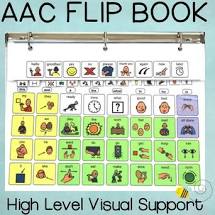
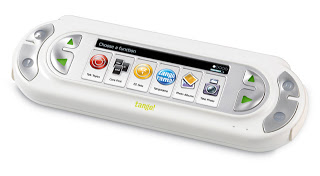
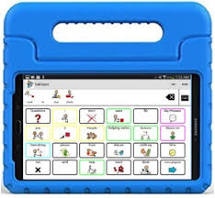
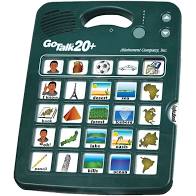
Augmentative and Alternative communication (AAC) devices are tools to help individual who may have little to no means of verbal communication, yet there is a difference between these two. Augmentative devices are used by people who have some speech abilities but, are unintelligible or with limited speech abilities. Alternative communication devices are for individuals with no ability for speech. These people will rely on communication devices to express wants, needs, ideas, etc. Four AAC devices that I have found are: IPAD with Proloquo2Go, GoTalk20+, AAC flip book, and the Dynavox Tango! device. 

If an individual has or buys an IPAD, they can download the app Proloquo2Go. Proloquo2Go is an app that allows individuals the opportunity to express themselves that they couldn’t do before.  The individual will tap on the pictures from their customizable home screen and the iPad will speak them aloud. This allows students to build vocabulary skills, sentence formation, communication and language skills. Also, students can use this app for requesting or asking questions to teachers or paraprofessionals. Students can also pick the words and the picture that go along with the word that best works for them. 

GoTalk20+ is a hand held device for only communication. There are five levels of recording messages that are stored on the device. One can have up to a 100 messages up to 15 minutes long. The levels are things or ideas that one might want to express in their daily life. The individual will touch the picture of their choosing and the device will speak it aloud. Students can use this device by helping them verbally expressing themselves about what they might need or desire. 

AAC flip book is a no tech communication device. This is a form of a picture book that using no electric or technology. It is a book of pictures that one will point too along with showing an adult or someone who can help them get the desire item or action. The flip book are pictures that one will use in their everyday according to that individual. The picture some from a software from one’s computer, Boardmaker. You might have the software in order to create these pages. This is a great tool for students because it does not require a charge and students might not always have access. It is also inexpensive to create and maintain.

Dynavox Tango! device is a communication device for individuals of all ages with speech and/or learning disabilities. The devices has a range of icons that appear on the screen that the individual would push and the device would speak them aloud. These icons can be customized for the individual. These icons are words that one might need to express themselves. There are over 6,000 words and 2,500 build in phrases that are preprogrammed. This can help students build sentence formation, communication skills, allows them to express themselves in the appropriate setting. 

References

AlbeData: Tools & Technology to Enhance Life. (n.d.). Dynavox Tango. https://abledata.acl.gov/product/dynavox-tango

App Store Preview. (n.d.). Proloquo2Go.

https://apps.apple.com/au/app/proloquo2go/id308368164

Attainment Company: Serving People with Disabilities. (n.d). GoTalk20+. https://

www.attainmentcompany.com/gotalk-20

Prehoda, Rosie. (n.d.) High level AAC flip communication book. 

https://www.teacherspayteachers.com/Product/High-Level-AAC-Flip-Communication-Book-2671603?gclid=CjwKCAjw95D0BRBFEiwAcO1KDOXGb70qwMHlhPABJxTxgkmSBZv6JXxJfKE0ObxMiTna4mqdc5C42xoCr-QQAvD_BwE

Module 4

Some things I have learned about accessible materials are the different programs that are available for students such as, text to speech, online readers, word processor, spell check. It also expresses the importance of offering these different softwares to all students because all students can benefit from them and it helps to decrease stigma if everyone has these programs. The first video explains that according to NIMAS, a student needs to have two different qualifications in order to receive materials. First a student needs to be identified with a print disability. The second is the student needs to have obtaining services under special education laws. 

Technology is extremely useful when obtained these accessible materials. We want to move away from printing only textbooks and materials because some students need reading softwares due to weakness in decoding or blindness. With these technology students achievement levels will increase and this will result in becoming a better member in society. Textbooks should come in print and online.

SPED 277

Alexandra Peskin

Spring 2020

Module 3 In the first video, one can truly see how Steve does not his ALS get in the way of his daily activities with his family, such as going on the football field with his son and wife or watching a movie with his son. It is so good to see that his ALS does not stop him from bonding with his son. You can see in the video how much he loves his son and how much his son adores him. With Steve having AT devices assessable to him, he is able to be a member of the family. Braylon uses AT to have the function of being able to walk. This impacts his life greatly, by having the freedom to walk, run, jog anywhere he wants. As his mother says “it opens up the world to him”. Braylon also used Microsoft technology to develop and assess his prosthetic’s. This allows them to program his legs in order for him to walk. The young woman in the third video using an TA device that helps her hear, cochlear implant. When using an cochlear implant and audiologist has to program them to ones hearing ability via computer software. Without the implant and the software, this woman wouldn’t get the chance to hear again.

Module 2 “How do you see UDL being used in your school?”
In the self-contained classroom I am in now, we use UDL all the time. Each student in the room is on an individualized curriculum that is best suited for oneself. No one students is on the exact same schedule. We do somethings together such as morning meeting but, when we are in center or stations, the student(s) at that one station has their own folder that is designed for that one student. Also, if the work is too hard or if the student is having a hard time with it, there are other options we can give to the student in substitution. Also, each week students learn three new sight words. The teacher will model and explain each word then give students whiteboards to practice and manipulate the word. When teaching academic areas, we use the correct terms and symbols that students need to know.
Module 1
When learning about UDL, it was interesting to me that I used these techniques in my classroom everyday without even knowing it. When a students does not understand the lesson, I will try to re-explain in a way they will understand it. It is so important for teachers to understand that one lesson plan does not fit all and it’s important to have back-up plans just incase student(s) do not understand or follow the set lesson. UDL is for all students and it makes sure everyone is involved in learning.

Design a site like this with WordPress.com
Get started